Figure 1:
Ethylene
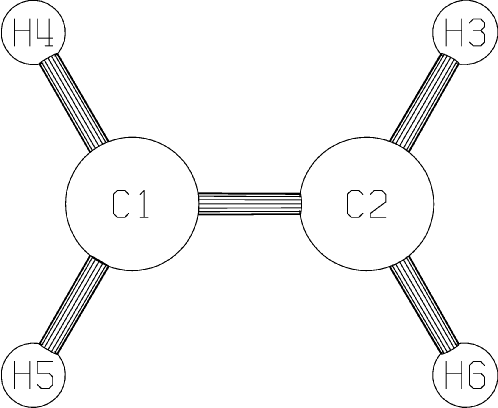 |
Ethylene is a simple organic molecule, of formula C2H4, shown in the figure below.
For this calculation, the bond-lengths and angles can be assumed. Unless instructed not to do so, MOPAC will automatically optimize the geometry. For this system, the data set is as shown in Figure 2.
Figure 2:
Data set for Ethylene
Line 1: VECTORS LOCAL PI PM6 Line 2: EXAMPLE OF MOPAC DATA-SET FOR ETHYLENE Line 3: The only geometric constraint is that the system must be planar Line 4: C Line 5: C 1.3 1 Line 6: H 1.1 1 120 1 0 0 2 1 Line 7: H 1.1 1 120 1 0 0 1 2 3 Line 8: H 1.1 1 120 1 180 0 1 2 3 Line 9: H 1.1 1 120 1 0 0 2 1 5 Line 10: |
Lines one through three are obligatory. If no name or comment is wanted, leave blank lines. If no keywords are specified, leave a blank line. A common error is to have a blank line before the keyword line: this error is quite difficult to find, so be careful not to have four lines before the start of the geometric data (lines 4-9 in the example). Whatever is decided, the three lines, blank or otherwise, are obligatory.
The next set of lines defines the geometry. In the example, the numbers are all neatly lined up; this is not necessary, but does make it easier when looking for errors in the data. The geometry is defined in lines 4 to 9; line 10 terminates both the geometry and the data-file. Any additional data, such as symmetry data, would follow line 10.
At any point in the data set, one or more comment lines can be introduced; these are identified by the presence of an asterisk (*) as the first character on the line. Comments are most often put before the first line of the data set (before Line 1), in which case they are printed in the .arc file and in the PDB file if PDBOUT is used, however, they can be anywhere, including in or after the Z-matrix, but these comments will not be printed in the .arc file. Comments are ignored by the calculation. They are useful when one or more atoms are to be excluded from a specific calculation. By adding an asterisk to the start of an atom-line, the atom is excluded; by removing its asterisk, an excluded atom can then be put back in to the calculation easily.
Figure 3:
Data set for Acetylene, with comments
         ********************************
         *                              *
         *  Example of a MOPAC data set *
         *                              *
         ********************************
Line  1: VECTORS LOCAL PI PM6
Line  2: EXAMPLE OF MOPAC DATA-SET FOR ACETYLENE
Line  3: The only geometric constraint is that the system must be planar
Line  4: C
Line  5: C   1.3 1
         *
         *   The supplied C-C distance is 1.3 A, the C-H distance is 1.1
         *   Angstroms, and the H-C-C angle is 120 degrees.
         *   During optimization, the angle will open to ~180 degrees.
         *
Line  6: H   1.1 1   120 1   0 0     2  1
Line  7: H   1.1 1   120 1   0 0     1  2  3
         *
         *  The next two lines are ignored
Line  8: *H   1.1 1   120 1 180 0     1  2  3
Line  9: *H   1.1 1   120 1   0 0     2  1  5
Line 10:
* Comments can be anywhere! |